Page 2 of 9
Re: Leela has a new version
Posted: Tue Jun 07, 2016 11:39 am
by Javaness2
Heh Mods
Can we get rid of this off topic slosh on antivirus? I don't see why it needs to be associated with Leela.
Re: Leela has a new version
Posted: Fri Jun 10, 2016 5:05 pm
by splee99
I just downloaded Leela. I'm using Gogui as interface to the Leela062GTP_OpenCL engine. I'm not sure if there is any GTP setting that I have missed, but Leela's strength on my computer is not as I expected. See my game record. I stopped playing when it played on the very side which didn't make any sense.
Re: Leela has a new version
Posted: Fri Jun 10, 2016 5:13 pm
by OtakuViking
Well you're obviously doing it wrong. Use the gui that comes with leela, set amount of sims to unlimited and pick minimum 30 minutes (that way it thinks for about 24 sec max per move). You can adjust this during the game if you want it to think longer and thus be stronger, or think less. Then it should be decent. Also, if you have a good gaming graphics card use GPU accelerated for more sims.
Re: Leela has a new version
Posted: Fri Jun 10, 2016 5:35 pm
by splee99
OK Maybe I know the reason. The Open_CL version doesn't work on my computer and the normal version is much stronger.
Re: Leela has a new version
Posted: Tue Jun 14, 2016 12:56 am
by Phobos
The engines run only on a 64-bit PC, right?
Re: Leela has a new version
Posted: Mon Jul 04, 2016 4:10 am
by Garf
Phobos wrote:The engines run only on a 64-bit PC, right?
No, the executable are all 32-bit so they'll work on both 32-bit and 64-bit.
Re: Leela has a new version
Posted: Mon Jul 04, 2016 4:16 am
by Garf
splee99 wrote:The Open_CL version doesn't work on my computer and the normal version is much stronger.
Update your video drivers. OpenCL support is provided by your video card.
Re: Leela has a new version
Posted: Mon Jul 04, 2016 4:36 pm
by splee99
Garf wrote:splee99 wrote:The Open_CL version doesn't work on my computer and the normal version is much stronger.
Update your video drivers. OpenCL support is provided by your video card.
Yes, I know, but I have a integrated graphic chip on the motherboard and the opencl device is actually the CPU itself. So I think I have to use the normal version. By the way, has anyone used the opencl version? I may want to buy a separate video card, but I don't think a low end one helps. Thanks.
Re: Leela has a new version
Posted: Sun Jul 10, 2016 7:16 am
by Drew
Forgive my stupidity, but how does one run this on Linux?
Re: Leela has a new version
Posted: Sun Jul 10, 2016 11:12 am
by pleiade67
This is a Windows program. So you may run it under wine. This worked under Mac OSX for me (non gpu version), so should be ok with Linux.
It works both as a standalone app or using Gogui with the gtp option.
Re: Leela has a new version
Posted: Sun Jul 10, 2016 10:11 pm
by as0770
Drew wrote:Forgive my stupidity, but how does one run this on Linux?
You can download the engine seperately, a linux compile is included. The Leela interface works well with wine.
You can run the engine with another user interface like GoGui. Under GoGui you can add the engine with it's command and the --gtp command line option:
/home/.../leela_062_linux_x64 --gtp
With the option --threads you can limit the used threads:
/home/.../leela_062_linux_x64 --gtp --threads 1
Good luck

Re: Leela has a new version
Posted: Mon Jul 11, 2016 6:11 am
by Drew
as0770 wrote:Drew wrote:Forgive my stupidity, but how does one run this on Linux?
You can download the engine seperately, a linux compile is included. The Leela interface works well with wine.
You can run the engine with another user interface like GoGui. Under GoGui you can add the engine with it's command and the --gtp command line option:
/home/.../leela_062_linux_x64 --gtp
With the option --threads you can limit the used threads:
/home/.../leela_062_linux_x64 --gtp --threads 1
Good luck
I've juuuuuuuuuuuuust started using Linux yesterday, so thank you for your patience. With your help I've got it running as a Program in GoGui. But I don't know how to run it from the CLI so that I can see the --help options?
EDIT - and I've now figured out that the correct CLI input is (assuming you're in the Leela dir) "./leela_062_linux_x64" ... I'm still unfamiliar with most of the syntax and was omitting the ./

Re: Leela has a new version
Posted: Mon Jul 11, 2016 7:19 am
by Babelardus
Drew wrote:
EDIT - and I've now figured out that the correct CLI input is (assuming you're in the Leela dir) "./leela_062_linux_x64" ... I'm still unfamiliar with most of the syntax and was omitting the ./
If it's any consolation, I've been working with Linux (as an embedded system or server) for about 15 years, next to Windows for desktop use.
I can't even count the times I forget "./" or type "cd /cygdrive/c/..." (because of Cygwin under Windows) in Linux, or try to do Linux stuff in Windows which doesn't work even though Cygwin is installed...
Re: Leela 0.7.0
Posted: Sun Oct 02, 2016 4:38 pm
by Bonobo
Version 0.7.0 is out, with heat map and improved analysis function, allegedly half a stone stronger than 0.6.2
• Strong Go engine including support for multiple processors and GPU acceleration
• Strength >4 dan on 19 x 19, high dan level on 9 x 9 (
http://www.gokgs.com/graphPage.jsp?user=LeelaBot)
• 2008 Computer Olympiad Silver (9x9) and Bronze (19x19) medalist
• Featuring Deep Learning technology
• Easy to use graphical interface
• Adjustable board size (up to 25x25!), playing levels, handicap and komi
• Fixed strength and time based difficulty levels
• Chinese rules with positional superko
• SGF format loading and saving
• Rated game mode with auto-adjusting difficulty levels
• Analysis features including critical variations for each move and winning odds
[end quote]
http://sjeng.org/leela.html
Re: Leela has a new version
Posted: Mon Oct 03, 2016 6:20 am
by macelee
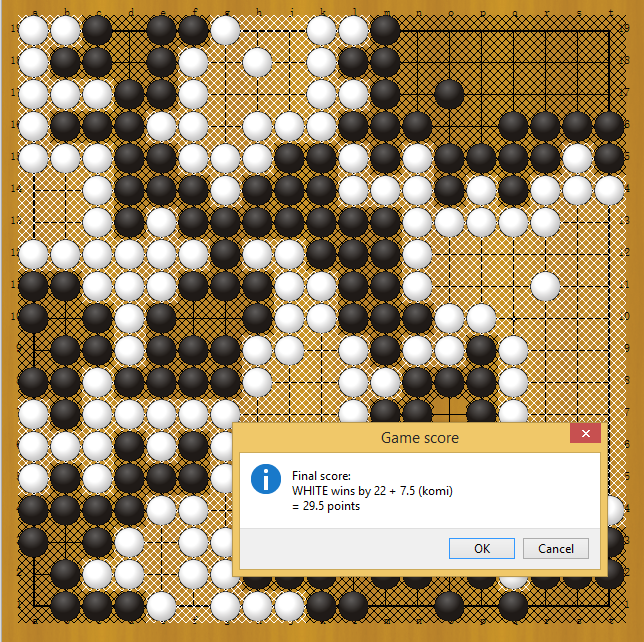
Maybe I missed something - how do I tell Leela that the upper-left group is actually dead?
- leela.png (258.63 KiB) Viewed 18835 times