Page 5 of 15
Re: ZBaduk - LeeLa Zero from your webbrowser
Posted: Sun Oct 27, 2019 8:41 pm
by msarrel
Hi,
I appreciate the recent upgrade to GPUX. However, I've notice two issues. First, the "Analyze full game" option takes much longer than before. Is there a way to speed that up while still using the load balancer? Second, the "Analyze this" option updates the display so quickly that my iPad cannot keep up. At such times, I am unable to place a new stone on the board to test a variation. I must turn off the analyzer, place the stone, and then turn back on the analyzer. Perhaps you could reduce the frequency of display updates for mobile devices while still keeping the same rate of GPUX calculations?
Thanks,
Marc
Re: ZBaduk - LeeLa Zero from your webbrowser
Posted: Fri Nov 01, 2019 3:48 pm
by spook
Dear msarrel,
Thank you for your feedback.
Some changes were made to address these issues.
First of all, ZBaduk now has the ability to setup a polling rate.
Even though, for now, this polling rate will only be used in "analyze this" mode.
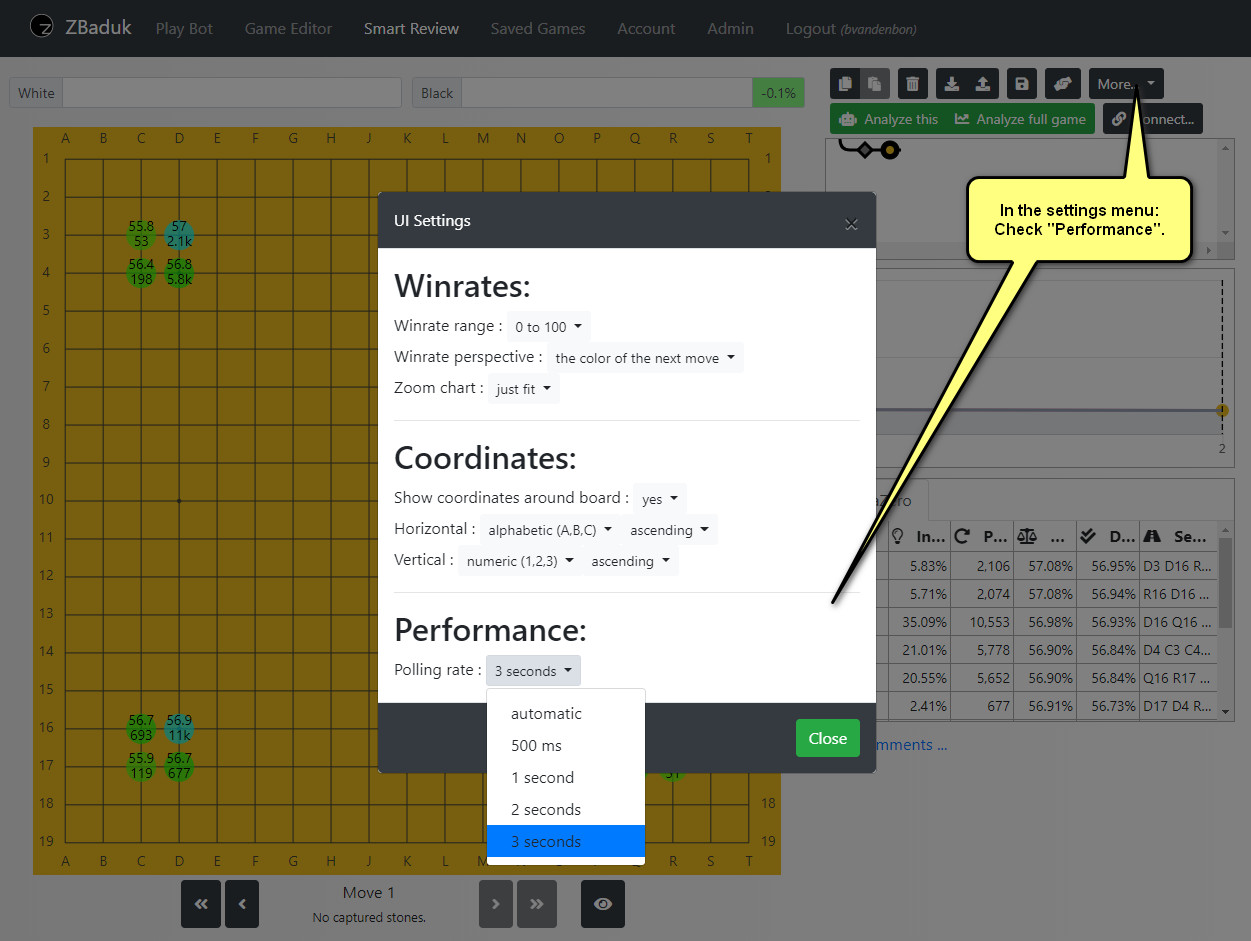
- sc1.jpg (202.18 KiB) Viewed 16386 times
But for the "Analyze full game" mode also things are heavily changed.
The internal communication has been improved here, making scans faster.
And we also added a kind of caching mechanism for our server to store results for popular positions.
(and this will be further fine-tuned in the near future)
But already now, you will notice that for the first few moves of your games,
there will be high amount of visits, without spending any time on them.
PS: about servers:
At times you may see a gpux and a gpux2.
Why ? --> because it allows us to install and test small changes,
without disconnecting everybody.
Re: ZBaduk - LeeLa Zero from your webbrowser
Posted: Fri Nov 01, 2019 7:06 pm
by msarrel
Thank you!
Re: ZBaduk - LeeLa Zero from your webbrowser
Posted: Sun Nov 10, 2019 9:14 am
by spook
3 new features for ZBaduk (installed earlier this week).
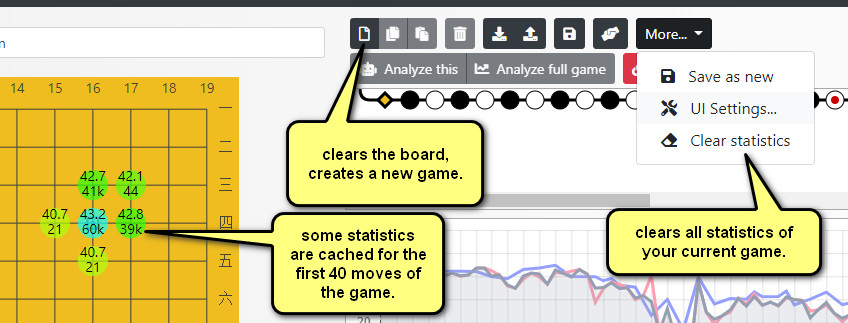
- new features.jpg (90.94 KiB) Viewed 16294 times
Re: ZBaduk - LeeLa Zero from your webbrowser
Posted: Fri Nov 22, 2019 3:39 pm
by spook
Lately, a lot of effort has gone in better caching mechanisms.
For the first moves of the game this saves a lot of time.
The server will memorize only positions of the first 40 moves of the game, and only for moves that have more than 1000 playouts.
It will store them in all 8 symmetries (which is very useful for hoshi openings).
Because some positions have been studied for a long time, ZBaduk has sometimes statistics for more than 100 different moves.
And it can be a bit overwhelming. For that reason, ZBaduk now has a new UI settings, which allows hiding some of these moves.
(Top 32 turns out to be perfect for the first position of the game).
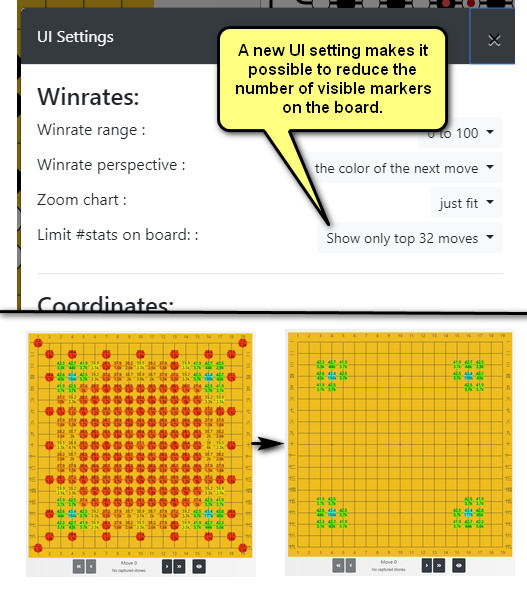
- reduce.jpg (119.68 KiB) Viewed 16171 times
Secondly, ZBaduk has added a new chart to visualize the number of playouts. Most oftenly this chart does not add much value and it will be hidden by default. But you can show/hide it using a new toolbar whenever you need it. It's especially useful, in the first minutes of a review, when the server is generating the winrate chart, because it gives a good indication of its progress.
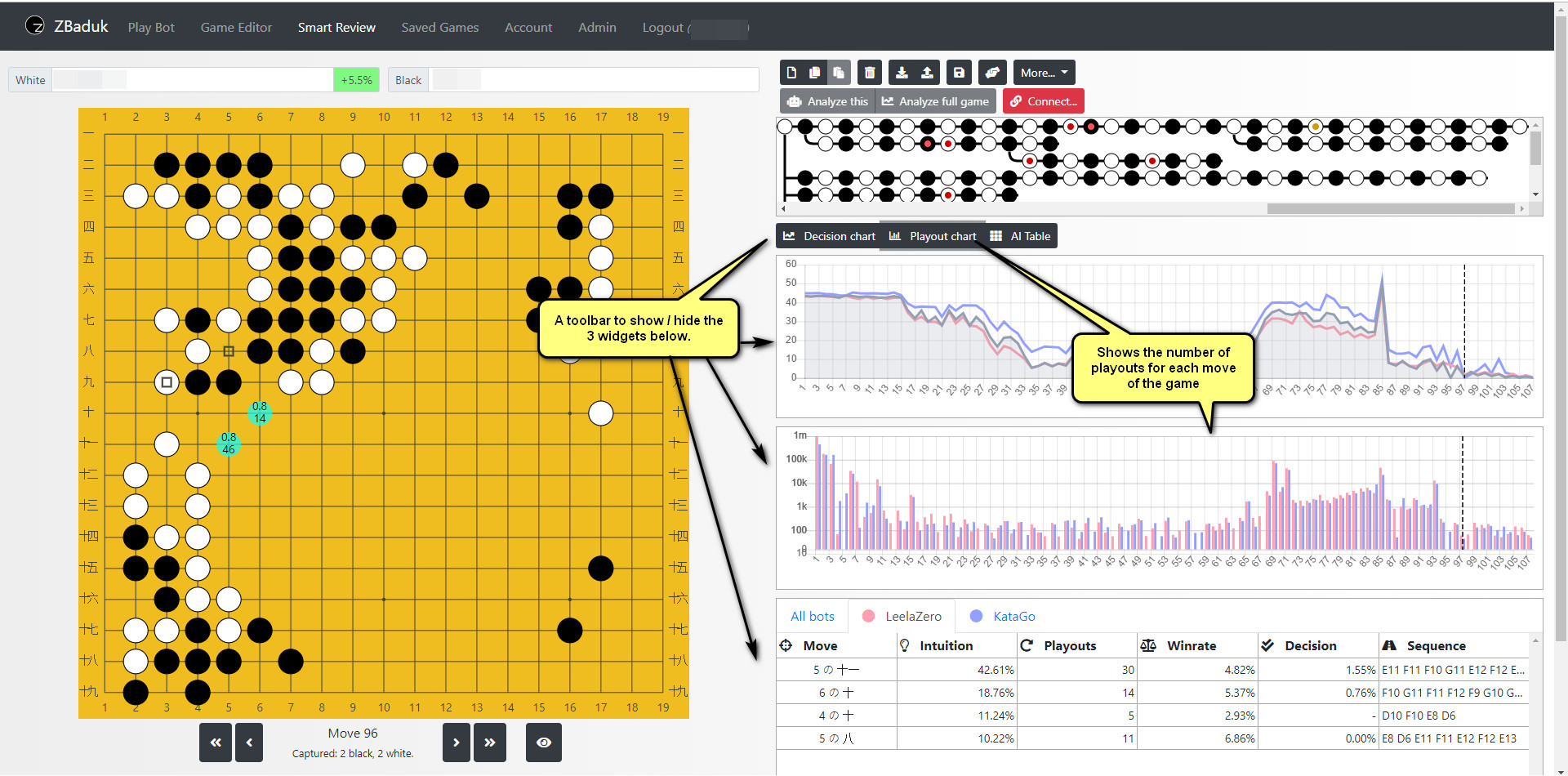
- new layout.jpg (486.35 KiB) Viewed 16171 times
Have fun !
And let me know what you think.
Re: ZBaduk - LeeLa Zero from your webbrowser
Posted: Fri Nov 22, 2019 4:56 pm
by Gomoto
Quick test with my raspberry pi worked reasonably well. I will recommend your website to my friends without dedicated graphics card.
Re: ZBaduk - LeeLa Zero from your webbrowser
Posted: Sun Dec 15, 2019 8:36 pm
by Maharani
Rookie question - when we're in review mode, are the read-outs we let it do stored on the server and added to its database?
Re: ZBaduk - LeeLa Zero from your webbrowser
Posted: Tue Dec 17, 2019 6:11 am
by spook
Maharani wrote:Rookie question - when we're in review mode, are the read-outs we let it do stored on the server and added to its database?
Yes they are, but you have to press the save button.
_Please note: When you quit your review, it will warn you if there are unsaved changes. (e.g. moves added)
However, one point of attention: you will not be warned about unsaved playout progress.
Right now, there is no warning, but ... perhaps something to be added in the future_
Re: ZBaduk - LeeLa Zero from your webbrowser
Posted: Sun Dec 22, 2019 9:22 pm
by Maharani
I've really been enjoying ZBaduk and will become a paying customer on my next paycheck.

One minor remark: the "sequence" displayed in the right-most chart column assumes that the vertical coordinates are arranged in ascending order, even if descending is selected in the UI settings. This is especially strange since the "move" in the left-most chart column assumes that vertical coordinates are arranged in descending order (as is customary), although this column does adapt to the chosen UI settings.
Re: ZBaduk - LeeLa Zero from your webbrowser
Posted: Sun Dec 22, 2019 11:43 pm
by Maharani
A much bigger issue I keep encountering is that in some situations, ZBaduk will stop playouts for certain moves and cannot be prodded to add further playouts. This happens under various circumstances, for example when focused position analysis is running and a past move in the tree is accidentally clicked. Once you return to the current move that you had been analyzing, ZBaduk will add no more playouts to the best moves (with some rare exceptions). It will (usually) run some slow playouts on moves that previously had a low amount of playouts (less than 1k I think).
If the "frozen" moves in question previously had a very high amount of playouts (say 100k), even deleting the game and returning to the position from scratch (and even if it is reached through a completely different move order) will not prompt ZBaduk into adding any further playouts to those moves (unless you switch to the other server, of course, but the issue persists if you switch back to the original server).
An example position that is almost completely stuck (particularly KataGo's moves) can be found at 1. R4* - 2. C3 - 3. D17 - 4. R16 - 5. Q17 - 6. R17 - 7. Q3 - 8. D15 - 9. C15 - 10. C14 - 11. C16 - 12. D14.
* ascending vertical coordinates if that matters
Re: ZBaduk - LeeLa Zero from your webbrowser
Posted: Mon Dec 23, 2019 3:33 pm
by spook
Maharani wrote: 1. R4* - 2. C3 - 3. D17 - 4. R16 - 5. Q17 - 6. R17 - 7. R4 - 8. D15 - 9. C15 - 10. C14 - 11. C16 - 12. D14.
Are you sure that this is correct ?
That's a strange sequence, because it contains R4 twice.
Perhaps I am missing something.
Actually, it should be impossible to paste a sequence which contains the same move twice.
So, if this really happened, I should double-check the validation logice for the paste action.
(I will look into this ASAP).
(But it would make sense that KataGo refuses to calculate statistics for it, if the path is invalid/impossible.)
Re: ZBaduk - LeeLa Zero from your webbrowser
Posted: Mon Dec 23, 2019 4:00 pm
by Maharani
Lol my bad - 7. should be Q3.
Re: ZBaduk - LeeLa Zero from your webbrowser
Posted: Tue Dec 24, 2019 2:00 am
by Maharani
The position is still completely stuck, as is the current one at move 27 in this game:
https://zbaduk.com/smartreview/GM-1977130960644-4698
The issue occurs on different devices and with different causes. Losing connection to the server will cause it (even after reconnecting). Even messing around with "show ownership" can completely freeze playouts. Will these problems resolve with the purchase of a membership?
EDIT: The playout freeze even happens across both servers (for moves with >1k playouts).
Re: ZBaduk - LeeLa Zero from your webbrowser
Posted: Sat Dec 28, 2019 12:09 am
by Maharani
In the now-current position, at move 33, LeelaZero's top move and all of KataGo's moves are also frozen (meaning all >1k moves).
Re: ZBaduk - LeeLa Zero from your webbrowser
Posted: Sat Dec 28, 2019 7:20 pm
by spook
Maharani wrote:One minor remark: the "sequence" displayed in the right-most chart column assumes that the vertical coordinates are arranged in ascending order, even if descending is selected in the UI settings. This is especially strange since the "move" in the left-most chart column assumes that vertical coordinates are arranged in descending order (as is customary), although this column does adapt to the chosen UI settings.
I just installed a new version that fixes this specific problem. It also adds some more color to the sequence notations.
(Personally I don't often use it, I prefer to just click the statistics, which shows a numbered preview on top of the board.)
The other mentioned issue is under investigation. Sorry for the inconveniences.
(I am not sure if a payed membership would make any difference for this exact issue.
But I can put you on a full-featured trial for a couple of days, if you like to test it.
Please send your account info to me in a private message, and I'll activate it for you).