noGo (open-source android goban) released on Google Play!

Tell the community about tournaments, new go sites, software updates, etc.
amnal
Lives in gote
Posts: 589
Joined: Fri Apr 23, 2010 10:42 am
Rank: 2 dan
GD Posts: 0
Been thanked: 114 times

noGo (open-source android goban) released on Google Play!

Post by amnal »

New version 0.3.0, available on Google Play shortly ( https://play.google.com/store/apps/deta ... nclem.nogo ) or right now at http://inclem.net/noGo/noGo-0.3.0-release.apk

---------

New version: Main changes include adding noGo to sgf open menus (e.g. in file-browsers or downloads), and adding an email-sgf button.

It'll be available on Google Play shortly, or immediately at http://inclem.net/noGo/noGo-0.2.3-release.apk

----------

Release update! I've made only very minor changes since the last version, but after a few queries and no massive bug reports I've deemed it ready for a proper release. It's now available on Google Play at https://play.google.com/store/apps/deta ... nclem.nogo , I hope it works great :)

I still have several things I'd like to implement very soon, and longer term plans. Updates will, of course, be available on the Play store.

----------

Another update: A new version is now online at http://inclem.net/noGo/noGo-0.1.8-release.apk. The big new feature is board and stone themeing support, with several skins available.

I've posted a few screenshots of the new themes at the bottom of the thread.

----------

Update: I've made a new version with several of the fixes people have already suggested. This is available at http://inclem.net/noGo/noGo-0.1.5-release.apk.

Fixes/improvements include:
- Fixed several scoring bugs, including hopefully the one inkwolf discovered.
- Significantly rejigged where games are stored so that they can be accessed in /sdcard/noGo, and added a message about unsaved games.
- Added an option to turn off board markers (triangle, square, letter/number markers etc.)
- Tweaked several popups to not overlap the keyboard.
- Made tablet mode rotate the right way so the tablet won't be upside down, though that's just a tweak, the layout is still the phone one that's not well suited to landscape.

---------------------

None of the existing android gobans work how I want, so I made my own! It's still not perfect, but at least it works the way I like ;) . I'm just working towards a first release on the Play store, but would anyone be interested in pre-release testing? There is an apk that should be fully working at http://inclem.net/noGo/noGo-0.1.3-release.apk , and it should work on any relatively recent android device. noGo is open source, with the code hosted at https://github.com/inclement/noGo.

Some particular features include:
- Open and edit multiple boards in one session
- Guess mode for playing through pro games
- Replace/insert moves and rearrange the mainline variation...highly convenient when recording games
- Navigate mode where tapping the board navigates the game rather than playing stones
- Simple area score mode
- ~1000 included pro games from Andries Brouwer's public domain collection

The app should work fine on any device with opengl es 2.0 (which includes most/all recent ones). It's written entirely in python (not java!) using the excellent kivy graphical framework. SGF and board logic is managed using the gomill set of python libraries.

I'd be delighted for any feedback, including bugs and feature requests/suggestions. I intend to put it on the play store as soon as I fix any major issues that come up.

Some currently missing features but planned for the near future include a proper tablet mode, edit tools for all the various sgf markers, and a simple game tree.

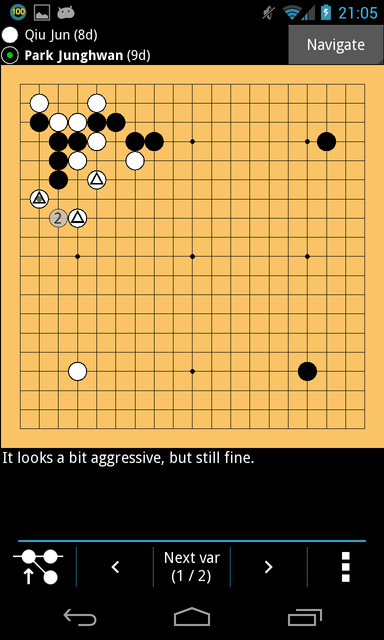
Edit: ...and here's a quick screenshot of a commented sgf, with a few more available at http://inclem.net/noGo/
Image
Last edited by amnal on Tue Aug 06, 2013 7:08 am, edited 12 times in total.
User avatar
EdLee
Honinbo
Posts: 8859
Joined: Sat Apr 24, 2010 6:49 pm
GD Posts: 312
Location: Santa Barbara, CA
Has thanked: 349 times
Been thanked: 2070 times

Post by EdLee »

Hi amnal, Congrats. Would it be possible to post some screenshots here
for people without Android ? (for feedback on the UI) Thanks.
amnal
Lives in gote
Posts: 589
Joined: Fri Apr 23, 2010 10:42 am
Rank: 2 dan
GD Posts: 0
Been thanked: 114 times

Re:

Post by amnal »

EdLee wrote:Hi amnal, Congrats. Would it be possible to post some screenshots here
for people without Android ? (for feedback on the UI) Thanks.


I just added a screenshot, and a link to some more, in the original post. Any comments welcomed, UI is something I can make good enough for me, but I have no real intuition for!

One thing I'm looking for is some nice stone/board graphics. The current ones are (as you can now see) little more than black/white circles.

Since the app is just python you can actually run it on any OS (at least...windows, linux, osx, and even ios in principle), though the ui is not at all useful without a touchscreen. I may try to make a nice packaged version for the desktop if anyone is interested.
User avatar
EdLee
Honinbo
Posts: 8859
Joined: Sat Apr 24, 2010 6:49 pm
GD Posts: 312
Location: Santa Barbara, CA
Has thanked: 349 times
Been thanked: 2070 times

Post by EdLee »

amnal, thanks for the screenshots. I like the current very simple and clean design
of the board and black and white stones. :) Simple and good.
Even if you later add newer, textured wooden boards or nicer stones,
please keep the current as an option.
User avatar
Inkwolf
Lives in gote
Posts: 472
Joined: Sat Apr 30, 2011 11:08 am
GD Posts: 0
Location: Wisconsin
Has thanked: 413 times
Been thanked: 462 times

Re: noGo - A new goban for Android

Post by Inkwolf »

Very cool! Overall, I think it's promising, and it's great that you;re working on a Go app like this!

Just for a first bug and snag report:

When I started a new game, it asked me where I wanted to save it, and gave me a selection of folders to choose from. In this case, you might want to provide an empty "My games" folder or something, so we don't need to choose whether to stash them in 'Kiseido' or 'Pro' or whatever.

I played a 9x9 game against myself and pressed the 'score' button. I got a message telling me to toggle groups as dead or alive, but when I tapped a group, the program exited.

I really like the navigation mode, where you tap on one side of the screen or the other to advance or go back, instead of having to hit the buttons.

The 'guess' mode is very cool! :batman:

It displayed all the comments on a commented game nicely, and variations.

The biggest problem I have found so far is an inability to go BACK. Once I have opened a file, I can't seem to find a way to exit the game and go back to the main menu. (Maybe I have to save the game to do that? What if I don't want to save it?) I had to actually shut down the tablet and restart it to open a different file. Also, less drastic, when navigating for a file to open, if you click on the wrong folder, there does not appear to be a way to go back to the main list without just canceling and starting the search over.

A feature you may want to include is being able to access external SD cards. I didn't see any way to do that in the file navigator.

When I used a different file manager program to select an SGF to open, NoGo did not appear in the list of programs available to open the file.

Acer A110 running 4.1.2, kernal version 3.1.10
amnal
Lives in gote
Posts: 589
Joined: Fri Apr 23, 2010 10:42 am
Rank: 2 dan
GD Posts: 0
Been thanked: 114 times

Re:

Post by amnal »

EdLee wrote:amnal, thanks for the screenshots. I like the current very simple and clean design
of the board and black and white stones. :) Simple and good.
Even if you later add newer, textured wooden boards or nicer stones,
please keep the current as an option.


I certainly will keep the current option, I like this way too!
Last edited by amnal on Mon Jul 01, 2013 2:23 am, edited 1 time in total.
amnal
Lives in gote
Posts: 589
Joined: Fri Apr 23, 2010 10:42 am
Rank: 2 dan
GD Posts: 0
Been thanked: 114 times

Re: noGo - A new goban for Android

Post by amnal »

Inkwolf wrote:Very cool! Overall, I think it's promising, and it's great that you;re working on a Go app like this!


Thanks for testing it :)

Just for a first bug and snag report:

When I started a new game, it asked me where I wanted to save it, and gave me a selection of folders to choose from. In this case, you might want to provide an empty "My games" folder or something, so we don't need to choose whether to stash them in 'Kiseido' or 'Pro' or whatever.


If you simply don't select a folder, the game is actually saved in a default collection called 'Unsaved', but I completely agree it isn't very discoverable! Part of the reason is that the app actually saves everything even if it doesn't appear in the gui, mostly because of my annoyance with other apps where I have to press save (which I kept forgetting...) or the game was lost.

That's a very good idea though, I'll have a My Games collection appear at the top of the list, that should make the options clearer at least.

I played a 9x9 game against myself and pressed the 'score' button. I got a message telling me to toggle groups as dead or alive, but when I tapped a group, the program exited.


Uh-oh, sounds like a definite bug, I'll get right on it.

I really like the navigation mode, where you tap on one side of the screen or the other to advance or go back, instead of having to hit the buttons.

The 'guess' mode is very cool! :batman:


Glad you like them! It's these little features whose absence annoyed me enough to write the app in the first place, it's nice to see it isn't just me that likes them ;)

It displayed all the comments on a commented game nicely, and variations.

The biggest problem I have found so far is an inability to go BACK. Once I have opened a file, I can't seem to find a way to exit the game and go back to the main menu. (Maybe I have to save the game to do that? What if I don't want to save it?) I had to actually shut down the tablet and restart it to open a different file. Also, less drastic, when navigating for a file to open, if you click on the wrong folder, there does not appear to be a way to go back to the main list without just canceling and starting the search over.


The android back button should always go back, does that not work? It's quite possible there's a bug in the code for it or in the framework itself.

For the file menu, there should always be a directory listed at top the called '..', which means 'go up one directory' - does that appear correctly? Actually, the file browser is in general a little crude, and maybe making this clearer would be a useful improvement.

A feature you may want to include is being able to access external SD cards. I didn't see any way to do that in the file navigator.


Ah, I guess I should take a closer look at how android manages the sdcards, I thought this should already be possible. By default the filechooser should show the directory '/sdcard', but I never properly checked what that actually necessarily means - is it actually internal storage in your device?

When I used a different file manager program to select an SGF to open, NoGo did not appear in the list of programs available to open the file.


Oops, I completely forgot about this. It should be possible, I'll add it :)

Acer A110 running 4.1.2, kernal version 3.1.10


Ah, this is a 7 inch tablet right? How is the UI on that screen, I've only tried on phones? My guess has been that the phone layout should scale okay to 7" or so, but I intend a proper tablet mode for larger screens. Also, I don't know if the screen is large enough for it to be useful, but (if you didn't already see it) there's an option to disable the touch offset in the settings screen, accessible in the top right of the homepage.

Thanks very much for all the great comments, they are all extremely useful. I can hopefully quickly fix the issues you raised :)
User avatar
Inkwolf
Lives in gote
Posts: 472
Joined: Sat Apr 30, 2011 11:08 am
GD Posts: 0
Location: Wisconsin
Has thanked: 413 times
Been thanked: 462 times

Re: noGo - A new goban for Android

Post by Inkwolf »

amnal wrote:
I played a 9x9 game against myself and pressed the 'score' button. I got a message telling me to toggle groups as dead or alive, but when I tapped a group, the program exited.


Uh-oh, sounds like a definite bug, I'll get right on it.


I tried it with 13x13 now, too. The first group I tapped was a live group, but it x-ed out nicely and unmarked when I tapped it again. Again it exited when I tapped a group of two white dead stones (I think that's the same thing that made it crash in the 9x9.)

The android back button should always go back, does that not work? It's quite possible there's a bug in the code for it or in the framework itself.


D'oh! Never thought of that. ^^ It works!

For the file menu, there should always be a directory listed at top the called '..', which means 'go up one directory' - does that appear correctly?


Yes it did, and I was able to access the external card from there. Thanks, I am not completely tech-savvy.


Ah, this is a 7 inch tablet right? How is the UI on that screen, I've only tried on phones? My guess has been that the phone layout should scale okay to 7" or so, but I intend a proper tablet mode for larger screens.
Also, I don't know if the screen is large enough for it to be useful, but (if you didn't already see it) there's an option to disable the touch offset in the settings screen, accessible in the top right of the homepage.


The screen looks good at 7 inches.

Screenshot_2013-07-01-08-43-16.png
Screenshot_2013-07-01-08-43-16.png (61.3 KiB) Viewed 18753 times


Ooh, I didn't notice the tablet modes! Yay, horizontal!!!
Screenshot_2013-07-01-09-07-14.png
Screenshot_2013-07-01-09-07-14.png (51.6 KiB) Viewed 18754 times

The only oddities may be that the onscreen android controls remain on the side instead of also rotating to the bottom of the screen. Also, it seems to rotate to one side only...the side that is, technically, upside-down, at least on my tablet. (Of course, you can turn the tablet any way you want, but if you have it in a stand or a cover that acts as a stand, it may end up resting on its power buttons.) It would be cool if the rotation was fully enabled so that whatever way you turned the tablet, it was right side up.
vpopovic
Lives with ko
Posts: 149
Joined: Fri Apr 05, 2013 10:59 am
Rank: KGS 7 kyu
GD Posts: 0
KGS: Vladimir
Location: Belgrade, Serbia
Has thanked: 12 times
Been thanked: 28 times

Re: noGo - A new goban for Android

Post by vpopovic »

If you keep putting so much effort into this app, I'll definitely switch Gobandroid HD with this one.

Features to add:
- printable output with move numbers
- couple of fancy skins for goban and stones
- on/off switch for goban marking (a, b, c... and 1, 2, 3...)

That's it for now.

Huge thanx for your effort. Keep up the good work.
amnal
Lives in gote
Posts: 589
Joined: Fri Apr 23, 2010 10:42 am
Rank: 2 dan
GD Posts: 0
Been thanked: 114 times

Re: noGo - A new goban for Android

Post by amnal »

Inkwolf wrote:I tried it with 13x13 now, too. The first group I tapped was a live group, but it x-ed out nicely and unmarked when I tapped it again. Again it exited when I tapped a group of two white dead stones (I think that's the same thing that made it crash in the 9x9.)


Aha, I can reproduce this so I should be able to fix it soon. Thanks!

The screen looks good at 7 inches.

Ooh, I didn't notice the tablet modes! Yay, horizontal!!!

The only oddities may be that the onscreen android controls remain on the side instead of also rotating to the bottom of the screen. Also, it seems to rotate to one side only...the side that is, technically, upside-down, at least on my tablet. (Of course, you can turn the tablet any way you want, but if you have it in a stand or a cover that acts as a stand, it may end up resting on its power buttons.) It would be cool if the rotation was fully enabled so that whatever way you turned the tablet, it was right side up.


Hmm, good point about the onscreen controls, that's a quirk of the framework I'm using. There are other ways of doing it though so I'll try to sort out something better integrated.

All the wasted whitespace in landscape mode makes me shudder, maybe I will promote tablet mode up my list of things to do!
amnal
Lives in gote
Posts: 589
Joined: Fri Apr 23, 2010 10:42 am
Rank: 2 dan
GD Posts: 0
Been thanked: 114 times

Re: noGo - A new goban for Android

Post by amnal »

vpopovic wrote:If you keep putting so much effort into this app, I'll definitely switch Gobandroid HD with this one.


Thanks for the comments, I'm glad to see people liking the direction :D

Features to add:
- printable output with move numbers
- couple of fancy skins for goban and stones
- on/off switch for goban marking (a, b, c... and 1, 2, 3...)


These are all good feature requests, and I'll do them soon.

For the first, do you mean as in create a series of images showing stages of the game with (say) 10 more moves per image, each numbered? Is this something gobandroid or another app already does, just for comparison?

Skins is definitely planned, the main barrier is I don't know of any good free stone/board images to use. If anyone knows any I'd be very grateful :) ...I'm sure I saw some linked once, but if so I can't find the thread any more.

On-off switch for markings should be easy, I'll add it straight away.

Thanks again for the suggestions.
vpopovic
Lives with ko
Posts: 149
Joined: Fri Apr 05, 2013 10:59 am
Rank: KGS 7 kyu
GD Posts: 0
KGS: Vladimir
Location: Belgrade, Serbia
Has thanked: 12 times
Been thanked: 28 times

Re: noGo - A new goban for Android

Post by vpopovic »

amnal wrote:
For the first, do you mean as in create a series of images showing stages of the game with (say) 10 more moves per image, each numbered? Is this something gobandroid or another app already does, just for comparison?


I was thinking about whole game on one sheet, but selecting from-to moves to be printed would be awesome.

I don't think that any Android app produces such pdf output. It would be unique feature for Android.
amnal
Lives in gote
Posts: 589
Joined: Fri Apr 23, 2010 10:42 am
Rank: 2 dan
GD Posts: 0
Been thanked: 114 times

Re: noGo - A new goban for Android

Post by amnal »

vpopovic wrote:
amnal wrote:
For the first, do you mean as in create a series of images showing stages of the game with (say) 10 more moves per image, each numbered? Is this something gobandroid or another app already does, just for comparison?


I was thinking about whole game on one sheet, but selecting from-to moves to be printed would be awesome.

I don't think that any Android app produces such pdf output. It would be unique feature for Android.


Gotcha. I'll see if I can rig up a simple version and see what customisation would make sense from there.
User avatar
EdLee
Honinbo
Posts: 8859
Joined: Sat Apr 24, 2010 6:49 pm
GD Posts: 312
Location: Santa Barbara, CA
Has thanked: 349 times
Been thanked: 2070 times

Post by EdLee »

Hi amnal, from Inkwolf's 7-inch screenshot:
Screenshot_2013-07-01-08-43-16.png
Screenshot_2013-07-01-08-43-16.png (61.3 KiB) Viewed 18694 times
The circles of the stones and the star points appear not anti-aliased. Is it because of the screenshot capturing,
or, are the original stones and star points not anti-aliased ? (Because everything else in the screenshot
appear to be anti-aliased.)
If this could be easily fixed, it would look nice to have anti-aliased stones and star points.
amnal
Lives in gote
Posts: 589
Joined: Fri Apr 23, 2010 10:42 am
Rank: 2 dan
GD Posts: 0
Been thanked: 114 times

Re: noGo - A new goban for Android

Post by amnal »

EdLee wrote:Hi amnal, from Inkwolf's 7-inch screenshot:

...

The circles of the stones and the star points appear not anti-aliased. Is it because of the screenshot capturing,
or, are the original stones and star points not anti-aliased ? (Because everything else in the screenshot
appear to be anti-aliased.)
If this could be easily fixed, it would look nice to have anti-aliased stones and star points.


I'm actually not sure, I've been meaning to check up on it, though I think you're probably right. Regardless, the screenshot isn't very flattering as the pixel density on your display is probably lower (possibly significantly) than that of most tablet or phone screens. I haven't previously spent much time on it because it does look much better on my own phone screen, though I fully agree it looks fishy in the screenshots.

I do intend to improve it either way, at the very least the stone drawing instruction can be replaced by an image map that should look better.

Edit: For reference, the smaller screenshot in my original post is displayed at about (with a standard desktop/laptop dpi anyway) the same physical size as my phone screen, and (at least on my end) looks significantly better than the full size tablet screenshot (edit: I think it's full size anyway) even though it has a much lower dpi and far fewer pixels than the real device. So even without antialiasing, that's the difference size and dpi make in having the screenshot look good or bad.
Post Reply