So, from an Oracle blog, some
background. I'd like to emphasize that although user workarounds are possible, it is the application author's responsibility to address this sort of thing and ample warning was provided.
That being said, I prefer the Java Control panel workaround. That way, if WMS gets around to updating CGoban, I'll get the latest version quicker.
So first, find the Java control panel. In Windows, you can launch the control panel and search for it:

- findjavacontrol.png (10.42 KiB) Viewed 39166 times
Click that thing that looks like a coffee cup drawn by an artist on psychedelics. (Don't get me wrong, I still like Duke.)
This will bring up a dialog with a bunch of tabs. Select the security tab.
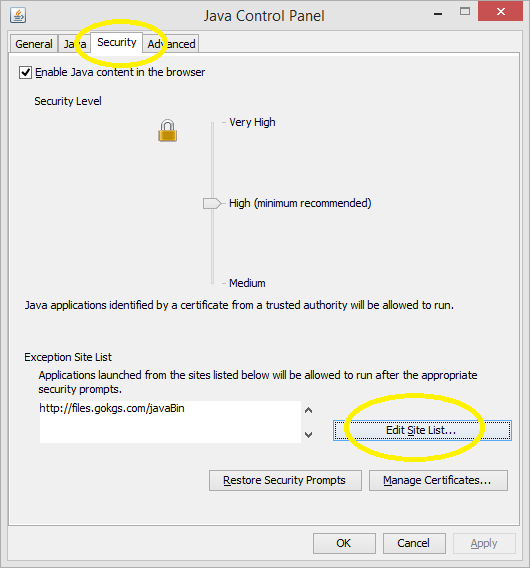
- javacontrol.png (24.07 KiB) Viewed 39166 times
Then, click the "Edit Site List" button and you should get this:
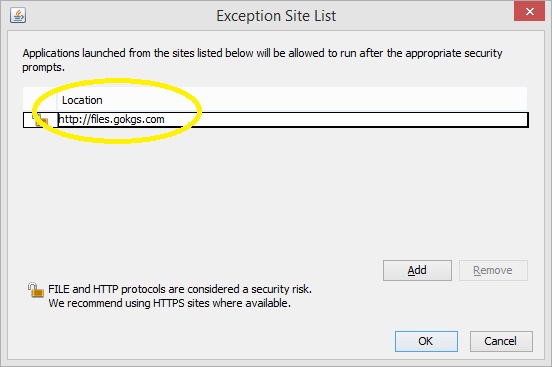
- javacontrol2.png (13.96 KiB) Viewed 39166 times
Add
http://files.gokgs.com, click Add, OK, and OK, and try again by going to
http://www.gokgs.com and following the link again to "Download Client and SGF Editor", then either "CGoban for Java Web Start" or "CGoban3 with no file association" as appropriate. (The latter is better if you already have another SGF editor installed that you prefer to use.)
If this does not help, I'd be curious to know so feel free to PM me.