Linux woes

All non-Go discussions should go here.
Post Reply
User avatar
Jujube
Lives in gote
Posts: 308
Joined: Sun Nov 14, 2010 8:49 am
Rank: EGF 5k Foxy 2k
GD Posts: 0
Has thanked: 54 times
Been thanked: 71 times
Contact:

Linux woes

Post by Jujube »

I'm a great fan of Linux and think it's wonderful... I've got a distressing story.

One of my great pleasures is the text editor. One such text editor for Linux is called Gedit. There was a plugin only available in Gedit 3. At the time, I was rocking with Linux Mint 17.2 on my desktop computer and having a nice time. But Gedit was version 2 in Mint. So I tried installing it from source.

Spent several good hours on forums and typing things into the terminal. :study:

I forgot that Linux likes to install thousands of libraries when installing certain things from source. Did I mention 40kbps internet connection speed? Yeah. So, that was no fun.

So I took a laptop to work and downloaded Fedora 21 onto a thumb drive instead. That had Gedit 3! I was happy. Then, I said, 'Oh, I want to play Endless Legend'. So, I downloaded Steam. Meanwhile, I remembered, I have to install a proprietary driver for ATI cards. Oops! Apparently, the driver is a pain in the fundament to install on Fedora and is not for the unskilled. Damn.

Spent several good hours on forums and typing things into the terminal. :study:

So... Took the laptop to work again. Downloaded Ubuntu 15.04. Yes! That had the proprietary driver, and it had Gedit 3! Installed that. And then, I started to have horrific wifi problems. It would keep swapping to power save mode, it would keep disconnecting when refreshing network lists, dmesg was displaying various strange things, the wifi would exhibit wildly different behaviour run to run, it didn't matter whether I was running NetworkManager or any of the other wrappers, I think the driver and the kernel are incompatible.

Then I read that the developers of Endless Legend never ported their game to Linux.

:cry:

So, tomorrow I'm going back to Linux Mint. Or maybe Fedora. In any case, my weekend did not deserve to be sledgehammered. I'm really quite upset.
12k: 2015.08.11; 11k: 2015.09.13; 10k: 2015.09.27; 9k: 2015.10.10; 8k: 2015.11.08; 7k: 2016.07.10 6k: 2016.07.24 5k: 2018.05.14 4k: 2018.09.03 3k: who knows?
macelee
Lives in sente
Posts: 928
Joined: Mon Dec 31, 2012 1:46 pm
Rank: 5 dan
GD Posts: 0
KGS: macelee
Location: UK
Has thanked: 72 times
Been thanked: 480 times
Contact:

Re: Linux woes

Post by macelee »

Chinese people call this 'no zuo no die' :)

http://www.urbandictionary.com/define.p ... zuo+no+die

Being a heavy Linux user myself for 15 years, My suggestion is to work with something that you are familiar with and has worked for you. Do not try to change too frequently.

Talking about gedit, I am not impressed. I have to open sgf files in a text editor. gedit crashed half of the time when opening something containing Korean or Chinese characters.
User avatar
Jujube
Lives in gote
Posts: 308
Joined: Sun Nov 14, 2010 8:49 am
Rank: EGF 5k Foxy 2k
GD Posts: 0
Has thanked: 54 times
Been thanked: 71 times
Contact:

Re: Linux woes

Post by Jujube »

I've installed Mint 17.2 again.

Wireless works perfectly, and I'm just installing Steam again.

Lesson learnt!

A shame Ubuntu 15.04 doesn't like my computer. But reading on the forums and support sites, it sounds like many, many people are having difficulties since NetworkManager went 1.0.xx. Kernel version is also different on Mint.
12k: 2015.08.11; 11k: 2015.09.13; 10k: 2015.09.27; 9k: 2015.10.10; 8k: 2015.11.08; 7k: 2016.07.10 6k: 2016.07.24 5k: 2018.05.14 4k: 2018.09.03 3k: who knows?
sparky314
Lives with ko
Posts: 189
Joined: Wed Mar 18, 2015 1:40 pm
Rank: KGS 3 kyu
GD Posts: 0
Location: Chicago, IL
Has thanked: 159 times
Been thanked: 36 times

Re: Linux woes

Post by sparky314 »

Still a fan of vim. Gedit works for a few things, Atom works nicely for a few others. But vim is usually the easiest.
User avatar
Jujube
Lives in gote
Posts: 308
Joined: Sun Nov 14, 2010 8:49 am
Rank: EGF 5k Foxy 2k
GD Posts: 0
Has thanked: 54 times
Been thanked: 71 times
Contact:

Re: Linux woes

Post by Jujube »

But vim is usually the easiest.


For the people who grok vi, certainly.

For the people who don't know their :q! from their ggVG, there are other editors.
12k: 2015.08.11; 11k: 2015.09.13; 10k: 2015.09.27; 9k: 2015.10.10; 8k: 2015.11.08; 7k: 2016.07.10 6k: 2016.07.24 5k: 2018.05.14 4k: 2018.09.03 3k: who knows?
skydyr
Oza
Posts: 2495
Joined: Wed Aug 01, 2012 8:06 am
GD Posts: 0
Universal go server handle: skydyr
Online playing schedule: When my wife is out.
Location: DC
Has thanked: 156 times
Been thanked: 436 times

Re: Linux woes

Post by skydyr »

Speaking as someone who occasionally has to connect to systems other people set up, if you can use vi (even in a rudimentary fashion) you are fine, but if you can't, you may not be able to edit effectively at all depending on what they installed. Regardless of whether it's your favourite editor or not, it's the only editor you can count on to exist on a unix-like system.
User avatar
Fedya
Lives in gote
Posts: 603
Joined: Tue Apr 20, 2010 8:21 pm
Rank: 6-7k KGS
GD Posts: 0
Has thanked: 43 times
Been thanked: 139 times

Re: Linux woes

Post by Fedya »

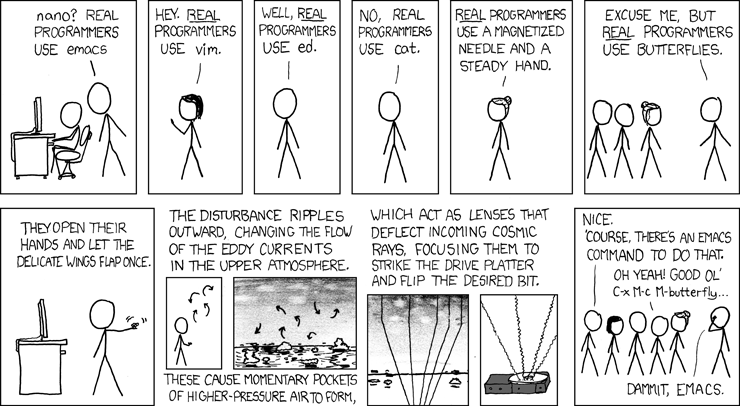
sparky314 wrote:Still a fan of vim. Gedit works for a few things, Atom works nicely for a few others. But vim is usually the easiest.

I know I've posted this before, but:

Image
User avatar
RBerenguel
Gosei
Posts: 1585
Joined: Fri Nov 18, 2011 11:44 am
Rank: KGS 5k
GD Posts: 0
KGS: RBerenguel
Tygem: rberenguel
Wbaduk: JohnKeats
Kaya handle: RBerenguel
Online playing schedule: KGS on Saturday I use to be online, but I can be if needed from 20-23 GMT+1
Location: Barcelona, Spain (GMT+1)
Has thanked: 576 times
Been thanked: 298 times
Contact:

Re: Linux woes

Post by RBerenguel »

macelee wrote:Chinese people call this 'no zuo no die' :)

http://www.urbandictionary.com/define.p ... zuo+no+die

Being a heavy Linux user myself for 15 years, My suggestion is to work with something that you are familiar with and has worked for you. Do not try to change too frequently.

Talking about gedit, I am not impressed. I have to open sgf files in a text editor. gedit crashed half of the time when opening something containing Korean or Chinese characters.


Yak shaving is the tech term I guess :D

As for text editors, you can't usually go wrong with emacs or vim (I wouldn't put my hand on vim's support for UTF8/multilingual-environment though, haven't checked, but emacs handles that well)
Geek of all trades, master of none: the motto for my blog mostlymaths.net
longshanks
Dies with sente
Posts: 97
Joined: Sat Nov 22, 2014 1:51 am
GD Posts: 0
Been thanked: 14 times

Re: Linux woes

Post by longshanks »

Jujube wrote:I've installed Mint 17.2 again.

Wireless works perfectly, and I'm just installing Steam again.

Lesson learnt!

A shame Ubuntu 15.04 doesn't like my computer. But reading on the forums and support sites, it sounds like many, many people are having difficulties since NetworkManager went 1.0.xx. Kernel version is also different on Mint.


When it comes to hardware compatibility the biggest issue is how recent the kernel is. The older the hardware the more likely it is the kernel driver team have caught up and implemented drivers to whatever device you're running. So if in doubt, run the most recent kernel you can.

As for installing from source. I believe the correct way in these cases is to either build your own .deb for mint, or compiling from source but fetching libraries needed via apt-get. At least making sure you are effectively building any gedit 3 against Mint 17.2 libraries. If you start building your own libraries and installing them you'll then have a mix-mash of libraries and the package management system will not be aware. Pain will ensue. Following steps online for how to compile gedit will be fine for how actually build it, but may go against how packages are supposed to be built for your system and so installation and dependencies issues may exist afterwards.

If this were debian you could pull the source package from Sid and build a binary package against stable yourself relatively easily (pull the package, run debbuild). There is also the backports facility which is effectively the same process but done for you, with some basic tracking of security updates going forwards. This just requires activation of this repository.

With all these Linuxes it's best to learn how they're supposed to be used so you don't end up fighting it.
Last edited by longshanks on Fri Oct 02, 2015 11:02 am, edited 1 time in total.
longshanks
Dies with sente
Posts: 97
Joined: Sat Nov 22, 2014 1:51 am
GD Posts: 0
Been thanked: 14 times

Re: Linux woes

Post by longshanks »

sparky314 wrote:I know I've posted this before, but [snip pic from xkcd]


That's pretty funny. Not seen that before :)
Last edited by longshanks on Wed Sep 30, 2015 6:05 am, edited 1 time in total.
User avatar
RBerenguel
Gosei
Posts: 1585
Joined: Fri Nov 18, 2011 11:44 am
Rank: KGS 5k
GD Posts: 0
KGS: RBerenguel
Tygem: rberenguel
Wbaduk: JohnKeats
Kaya handle: RBerenguel
Online playing schedule: KGS on Saturday I use to be online, but I can be if needed from 20-23 GMT+1
Location: Barcelona, Spain (GMT+1)
Has thanked: 576 times
Been thanked: 298 times
Contact:

Re: Linux woes

Post by RBerenguel »

skydyr wrote:Speaking as someone who occasionally has to connect to systems other people set up, if you can use vi (even in a rudimentary fashion) you are fine, but if you can't, you may not be able to edit effectively at all depending on what they installed. Regardless of whether it's your favourite editor or not, it's the only editor you can count on to exist on a unix-like system.


Actually that's cat, if you go down the rabbit hole of barebones linux systems. Cat, ed, nano/vi(m) and emacs is the usual hierarchy of availability
Geek of all trades, master of none: the motto for my blog mostlymaths.net
Mike Novack
Lives in sente
Posts: 1045
Joined: Mon Aug 09, 2010 9:36 am
GD Posts: 0
Been thanked: 182 times

Re: Linux woes

Post by Mike Novack »

Non 'nix folks aren't going to be able to understand this. To help them.

The vi(m) vs (x)emacs is old and bitter and represents more than simply preference of editors but is a wider philosophical division.

vi(m) is simply an editor.

emacs is a much wider "environment", could also use email and for having a LISP environment available. Because emacs written in LISP and a LISP environment provided, you could customize the behavior of the editor (but that's WAY beyond an ordinary user).

I used a (modern GUI* variant) vi for ordinary editing task but emacs if I wanted to write/test a LISP program.

* Need to explain, but some of these editors are "language sensitive". In other words, you can tell it "this document is a program in the c language" and the editor knows the syntax rules for c --- can put different "parts of speech" in different colors, indent properly, spot missing parts of a construct, etc. For example, you are typing along and all of a sudden what you think is code appears in the "comment" color; oops, you missed putting in an "end of comment".

I would find using any of these editors a pain for ordinary text editing, but for writing code, great.
User avatar
RBerenguel
Gosei
Posts: 1585
Joined: Fri Nov 18, 2011 11:44 am
Rank: KGS 5k
GD Posts: 0
KGS: RBerenguel
Tygem: rberenguel
Wbaduk: JohnKeats
Kaya handle: RBerenguel
Online playing schedule: KGS on Saturday I use to be online, but I can be if needed from 20-23 GMT+1
Location: Barcelona, Spain (GMT+1)
Has thanked: 576 times
Been thanked: 298 times
Contact:

Re: Linux woes

Post by RBerenguel »

Agree mostly with everything Mike says except this.

Mike Novack wrote:[...]

I would find using any of these editors a pain for ordinary text editing, but for writing code, great.


I use emacs for 90% of all my writing, the only thing I don't use it for is Markdown, because I use an editor with real-time preview (probably I could either find a package to do it in emacs or do it myself, even.) Basically there is no awesome package for markdown in emacs (yet.) I use emacs for all my work email (I used to use gnus, now I use mu4e,) all programming work and writing my PhD dissertation in TeX (using the great AucTeX package, which includes inlined previews of TeX formulas.) In the past I've tried to use "emacs for everything" to see how far I could get it, even browsing from within emacs.

Vim (and emacs with the evil package, which adds a kind of emulation layer of vim commands to emacs) are awesome for text editing. I no longer remember how to do it in proper emacs (so I'll use the vim way.) You want to delete the rest of the sentence you are in? You type dt. (delete 'til point) You want to change this word? ciw (change inside word, you could also use around to change the delimiters or spaces around it, or use c1w for change 1 word, c2w for changing this word and the next... etc.) Emacs rocks (I could say vim, but since emacs can simulate a pretty decent vim, I deem it the winner of the war.)
Geek of all trades, master of none: the motto for my blog mostlymaths.net
Post Reply